
-33%




XTOOL D9MAX J2534 ECU Coding And Programming Automotive Best OBD2 Scanner
Original price was: £2,869.99.£1,922.89Current price is: £1,922.89.
2025 XTOOL X100 MAX2 J2534 ECU Car Key Programmer Car Diagnostic Scanner AutoAuth
Original price was: £3,869.99.£2,592.89Current price is: £2,592.89.
XTOOL XVCI MAX J2534 OBD2 Automotive Scanner ECU Coding Active Test CAN FD DoIP
Original price was: £799.99.£535.99Current price is: £535.99.
Description
XTOOL OFFICIAL STORE PROMISE
XTOOL XVCI MAX is a professional programming equipment for cars which supports SAEJ2534-1 and SAEJ2534-2 two international programming protocols. It can enter For BMW and For Mercedes online programming coding in free account. It supports For Land rover, For Jaguar, For Volvo, For Toyota, For GM, For Honda OEM diagnosis software.

XTOOL XVCI MAX ECU Programming
XTOOL XVCI MAX with ECU Programming to reflash/reprogram second-hand or blank ECUs, flash hidden functions to enhance car performance.
Fixing software-controlled drivability &emission issues
Enhance the Durability of Mechanical Parts
Improve Fuel Efficiency

XTOOL XVCI MAX ADVANCED ECU CODING
XVCI MAX Performs ECU Coding to flash the hidden functions, help mechanics activate-the potential of cars and extend business to high-end models.
Programmable Module
Recode Changed Modules>Auto Side Mirrors Folding
Refresh Hidden Features>Auto Engine Start-Stop
Renew ECUs Coordination
Reinforce performance
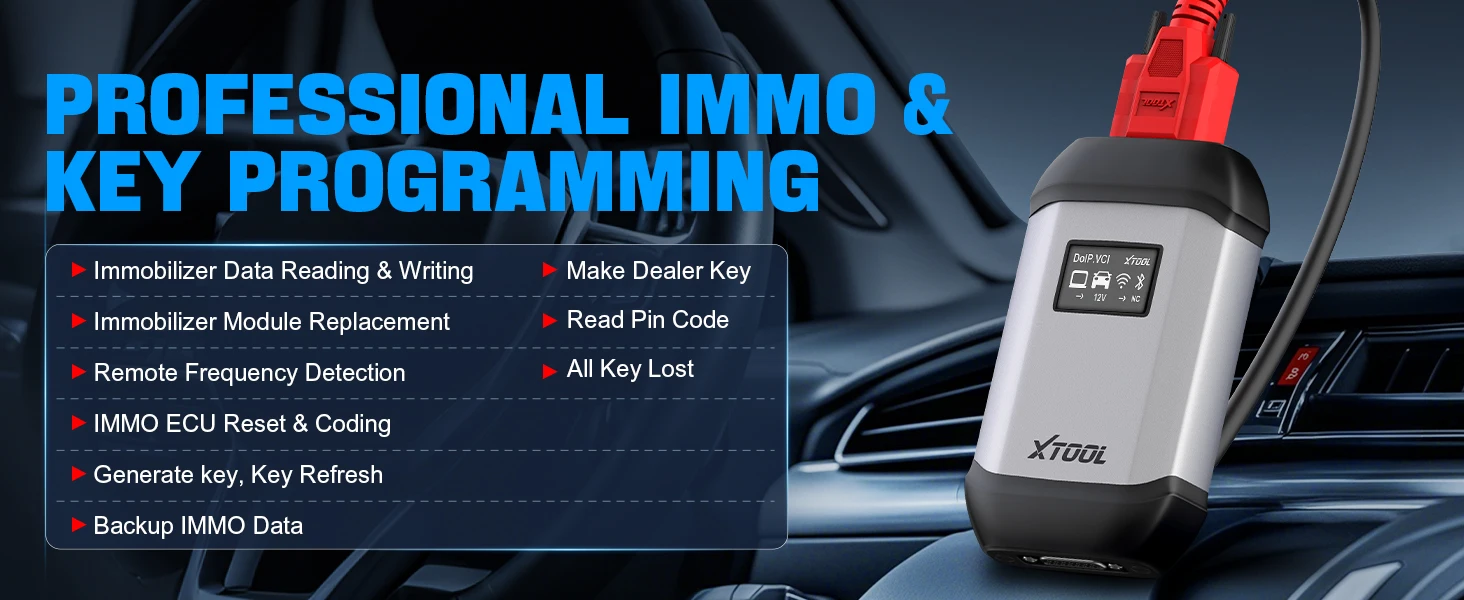
XTOOL XVCI MAX PROFESSIONAL IMMO & KEY PROGRAMMING
➤lmmobilizer Data Reading & Writing
➤lmmobilizer Module Replacement Remote Frequency Detection
➤Make Dealer Key
➤Read Pin Code
➤All Key Lost
➤IMMO ECU Reset & Coding
➤Generate key, Key Refresh
➤Backup lMMO Data
➤Make Dealer Key
➤Read Pin Code
➤All Key Lost

What should be installed on the PC?
1. Original software (original diagnostic software and its account, you need to handle it yourself)
2. J2534 VCI (provided by us)
3. Specified driver software (provided by us)
XTOOL XVCI MAX Requirements for Matching Computers
Software installation requirements
Processor: 1.6GHz or faster.
Memory: DDR4GB or above.
Hard disk: 80GB or above.
Network interface: LAN100/1000M
Communication interface: USB 2.0 or USB 3.0
Wireless network: 802.11a/b/g/n WiFi
Operating system: Windows 10/8/7
Browser: Internet Explorer 11 or later
Do Net remote diagnosis component requires Internet Explorer 11 or later.
Windows7 system needs to upgrade IE browser to the latest version.
Download Internet Explorer 11 (32-bit)
Download Internet Explorer 11 (64-bit)
Note: Windows XP system has stopped supporting!

XTOOL XVCI MAX Product Driver Installation Steps
1.Enter the XTOOL official website: https://www.xtooltech.com/english/UpgradeNotice.html, click Download Center
2.Click “PC”, find “XVCI MAX”, and click “Download”
3.Double click and install
4.Follow the prompts to install step by step.
Note:
1.Before installation, you need to turn off the firewall, eliminate all anti-virus software on your computer, and provide authorization as prompted.
2.The authorization must be renewed every 60 days. The authorization is free, but the validity period is 60 days.

XTOOL XVCI MAX 2 Connection Methods
1.Bluetooth/WiFi Connection
PC(Downloaded Application)—Bluetooth/WiFi—J2534 Box—OBD2 Cable—Vehicle
2.Cable connection
PC (Downloaded Application)—USB Cable—J2534 Box—OBD2 Cable—Vehicle

XTOOL XVCI MAX Compatible Models
Supported Cars: For Jaguar, For Land Rover
Supported Models and Year: For SDD 2007-2016
For PATHFINDER (DOIP) Pathfinder 2017 to Present
Supported Cars: For Ford, For Lincoln, For Ford Mustang
Supported Models and Year: 2005-2021 (does not support F-series Pickups and Heavy Vehicles before 2010)
Supported Cars: For Mazda
Supported Models and Year: 2005-Present
Supported Cars: For GM (For Buick, For Chevrolet, For Cadillac, For Opel, For Saab) does not Support CAN FD
Supported Models and Year: 2000-Present
Supported Cars: For Porsche
Supported Models and Year: 2005-2017 (with engineer development version mode)
Supported Cars: For Subaru
Supported Models and Year: 2005-Present

XTOOL XVCI MAX PACKING LIST
1PC * XVCI MAX
1PC * Tool Case
1PC * Main Cable
1PC * USB3.0 Main Cable
1PC * OBD II-16
1PC *User Manual

Reviews (0)
Shipping and Delivery





Reviews
There are no reviews yet.